whatsapp & notifications

whatsapp & notifications

atom715

New Member
Thread Starter
Joined
Oct 17, 2017
Messages
11
Reaction score
7
Hello, I am running iOS 11.0.3 with an iPhone 7 plus. I am having issues using WhatsApp, I am in a group with many people within my company and most of the time I do not get any notifications, I have to load up the app to see any new messages that had come through while the phone was in my pocket. The incoming message use to show up on my lock screen and notification center until I clear the notification. But now they do not even show up on my phone at all. Same thing has been happening to mail. Did apple remove push notifications all together?!?!
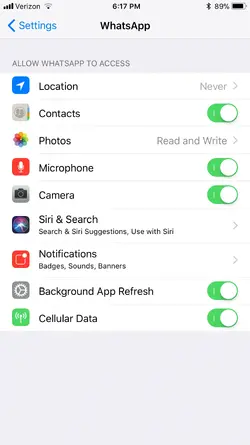
 
Have you checked your notifications settings to make sure Irving changed? That would be the first place I’d look.
 
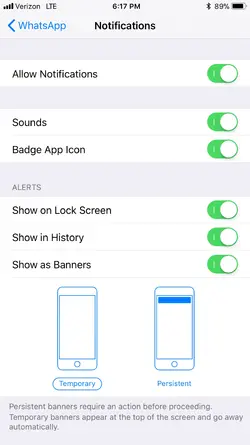
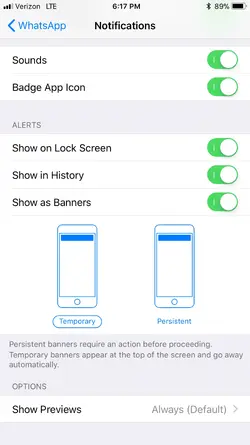
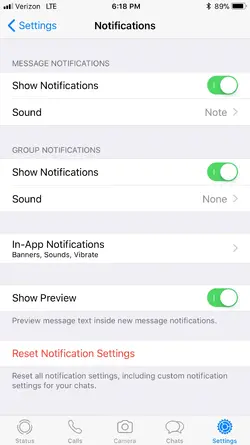
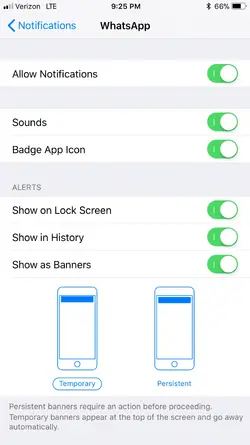
Yes. All notification for this app are enabled.
 

Attachments

  • 55AB7959-EF2D-4CD6-840E-0028C896D756.webp
    55AB7959-EF2D-4CD6-840E-0028C896D756.webp
    61.5 KB · Views: 629
  • 4DBEB2A1-3BC8-41E4-A8A0-33175D09A66F.webp
    4DBEB2A1-3BC8-41E4-A8A0-33175D09A66F.webp
    59.8 KB · Views: 643
  • BE75C12E-C5BA-4883-ADEA-BCDAED0D6E6B.webp
    BE75C12E-C5BA-4883-ADEA-BCDAED0D6E6B.webp
    62 KB · Views: 644
  • 99A78E89-8061-4561-B4E6-679046F40D5F.webp
    99A78E89-8061-4561-B4E6-679046F40D5F.webp
    68.2 KB · Views: 612
  • Like
Reactions: 933
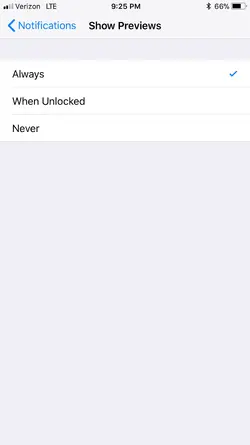
Try going into the Notification settings in the main Notification area. Then to WhatsApp from there. I believe there are some different settings. Try it for mail as well. The setting you may want to look at is under "show options", you have the choice of always, when unlocked, and never (default).
 
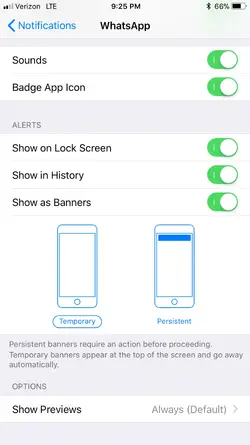
Yes I have the show previews option set to always(default) for what's app. It in the bottom in the third picture I posted earlier.
 
Hmm, in the Notification Center itself mine shows “Options” for Previews. What I see in your pic is only if the preview is on or off?
 
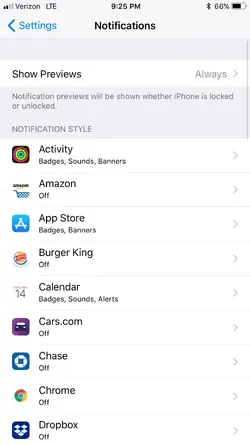
These are my options under notifications in settings
 

Attachments

  • CBA7BEB3-223B-493D-BF32-AC0E0F6B721F.webp
    CBA7BEB3-223B-493D-BF32-AC0E0F6B721F.webp
    63.4 KB · Views: 588
  • 87177DC3-0739-4A60-91DE-8B8AF35ABC51.webp
    87177DC3-0739-4A60-91DE-8B8AF35ABC51.webp
    22.3 KB · Views: 606
  • 9B9FA665-9E4A-4619-9014-DAB1FBEE2127.webp
    9B9FA665-9E4A-4619-9014-DAB1FBEE2127.webp
    62.3 KB · Views: 573
  • 64E24F6E-28C0-4470-895D-3B9E3831D763.webp
    64E24F6E-28C0-4470-895D-3B9E3831D763.webp
    62.5 KB · Views: 600
Ok, that last one is the setting I was talking about. Looks like you have it right. Wish I had other ideas. Have you deleted and then reinstalled the app?
 
No I haven't, I was trying to avoid that bc idk if it's an app issue or an iOS 11 issue because I can't even find "push" notifications anywhere in iOS 11.
 
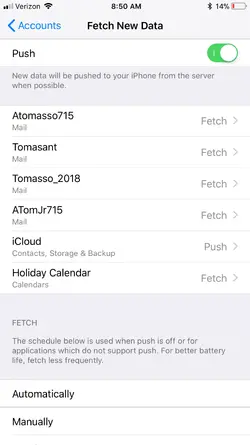
Look under settings/ accounts & passwords. The one with the key on the animation. Open that and it shows at the bottom.
IMG_3185.webp
 
Hope that helps some at least!! Good day.
 
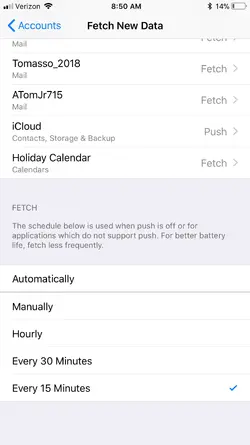
I just checked those settings and this is what they are like. They are all in and fetch every 15 min. Which is, I think, as fast as fetch will go.
 

Attachments

  • B25809FE-8149-408D-9F96-F6720A4029F3.webp
    B25809FE-8149-408D-9F96-F6720A4029F3.webp
    60.5 KB · Views: 576
  • 5017DBCB-026C-4704-9911-CFA0AAD7E5D0.webp
    5017DBCB-026C-4704-9911-CFA0AAD7E5D0.webp
    56.9 KB · Views: 565
Should be working then. If not change them to push like your iCloud is set. Might work.
 
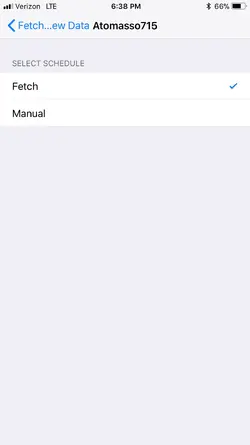
Under the acccounds imthere is only a fetch option or a manual option.
 

Attachments

  • 7F829183-CAD9-451C-9D65-D5767C009737.webp
    7F829183-CAD9-451C-9D65-D5767C009737.webp
    20.2 KB · Views: 566
Change Banners to Persistent, the notification will stay on the screen until acknowledged. You may be getting notifications but too short to see.
 

Latest posts

Back
Top