Pgreenwell New Member Thread Starter Joined Jan 7, 2014 Messages 7 Reaction score 0 Mar 2, 2014 #1 Can someone please explain how to attach a document to an email?
VTR Well-Known Member Joined Apr 16, 2011 Messages 2,183 Reaction score 76 Mar 2, 2014 #2 G'day and welcome to the site!!!!! In what device and with which email client?
Pgreenwell New Member Thread Starter Joined Jan 7, 2014 Messages 7 Reaction score 0 Mar 3, 2014 #3 Of course....iphone 5c and i have a cox.net email account.
rasmith1959 Active Member Joined Feb 18, 2014 Messages 394 Reaction score 142 Location Guthrie, OK Mar 4, 2014 #4 Pgreenwell said: Of course....iphone 5c and i have a cox.net email account. Click to expand... But what email app are you using? Is it the stock one or something else? Sent from my iPhone 5c using Tapatalk
Pgreenwell said: Of course....iphone 5c and i have a cox.net email account. Click to expand... But what email app are you using? Is it the stock one or something else? Sent from my iPhone 5c using Tapatalk
Pgreenwell New Member Thread Starter Joined Jan 7, 2014 Messages 7 Reaction score 0 Mar 8, 2014 #5 Stock apple
VTR Well-Known Member Joined Apr 16, 2011 Messages 2,183 Reaction score 76 Mar 8, 2014 #6 I use the stock Apple email client app on my iPhone5 and I cannot attach pics or files to send. It does not appear to have the option to do so there.
I use the stock Apple email client app on my iPhone5 and I cannot attach pics or files to send. It does not appear to have the option to do so there.
Ledsteplin Well-Known Member Joined Oct 23, 2013 Messages 4,711 Reaction score 8,870 Location Florence, AL Mar 8, 2014 #7 How do I delete a post? Attachments $image-3165248218.webp 22.5 KB · Views: 547 $image-2283995593.webp 21.8 KB · Views: 491 Last edited: Mar 8, 2014
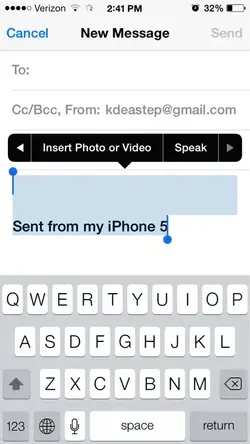
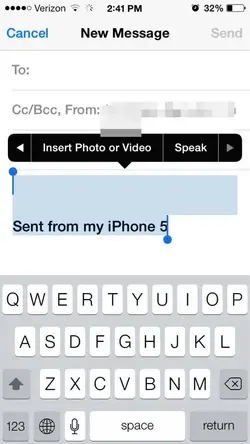
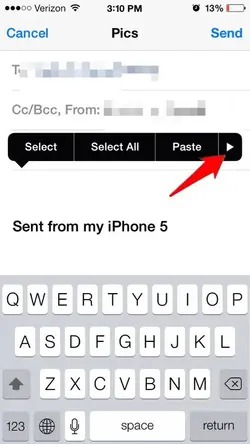
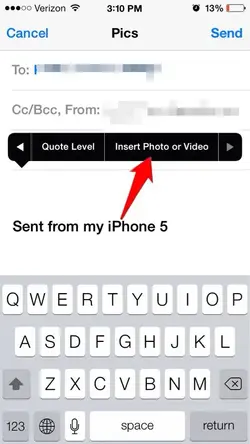
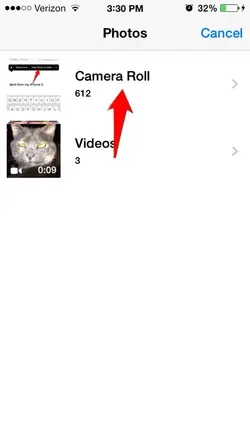
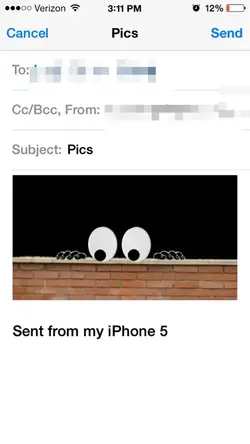
Ledsteplin Well-Known Member Joined Oct 23, 2013 Messages 4,711 Reaction score 8,870 Location Florence, AL Mar 8, 2014 #8 How to attach photo and video to iPhone stock mail app email. 1. Press on message field to bring up options. Tap arrow at the end. 2. Then tap Photo or Video. 3. Tap on camera roll. 4. Tap a photo and hit choose. 5. The photo should be on the email.
How to attach photo and video to iPhone stock mail app email. 1. Press on message field to bring up options. Tap arrow at the end. 2. Then tap Photo or Video. 3. Tap on camera roll. 4. Tap a photo and hit choose. 5. The photo should be on the email.
Pgreenwell New Member Thread Starter Joined Jan 7, 2014 Messages 7 Reaction score 0 Mar 8, 2014 #9 Absolutely amazing!! Thank you so very much. It works!!
VTR Well-Known Member Joined Apr 16, 2011 Messages 2,183 Reaction score 76 Mar 10, 2014 #10 Well wow and there you go. . . . I did not know that Thanks Ledsteplin!!!
Ledsteplin Well-Known Member Joined Oct 23, 2013 Messages 4,711 Reaction score 8,870 Location Florence, AL Mar 11, 2014 #11 You can also copy from the camera roll and paste to the email.
J joice33 New Member Joined Nov 24, 2014 Messages 19 Reaction score 6 Nov 27, 2014 #12 It's very simple. Click on attachment. Select your desired location. Click on desired file and wait. When attachment completed hit send button. Okey?
It's very simple. Click on attachment. Select your desired location. Click on desired file and wait. When attachment completed hit send button. Okey?
J joice33 New Member Joined Nov 24, 2014 Messages 19 Reaction score 6 Nov 28, 2014 #13 Oh! It's amazing .......
J joice33 New Member Joined Nov 24, 2014 Messages 19 Reaction score 6 Nov 29, 2014 #14 I have attached details into my 3rd post you should follow how to do this.